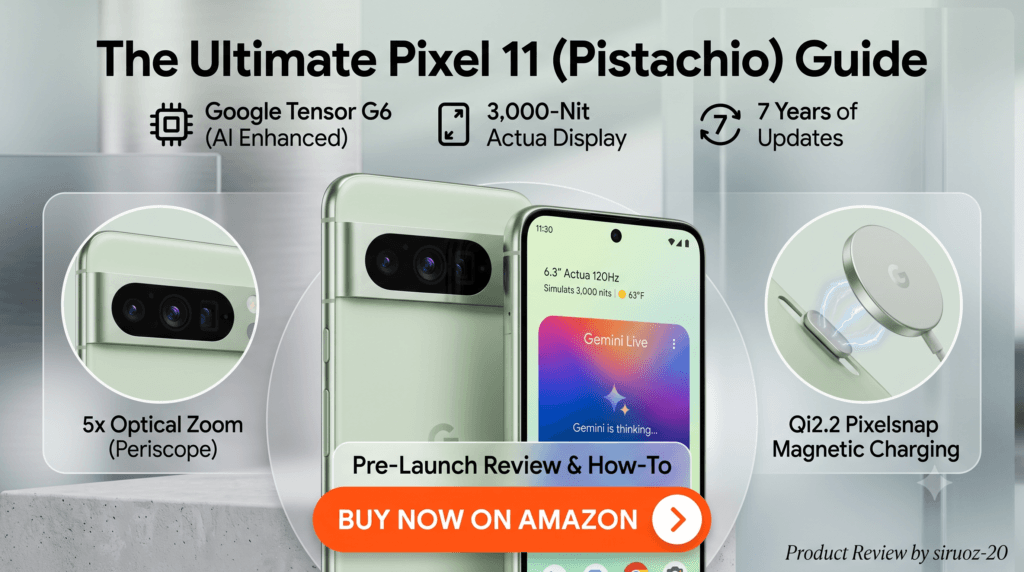
Google’s flagship smartphone has arrived: the Google Pixel 11 in its fresh Pistachio finish blends refined aesthetics, cutting-edge hardware, and deep Gemini AI integration to redefine the everyday mobile experience.

Whether capturing spontaneous portraits, multitasking through workdays, or seeking a phone that anticipates next actions, the Pixel 11 is built from the ground up for seamless speed and long-term durability. Powered by the next-generation Google Tensor G6 processor and backed by 7 full years of OS updates, it delivers a smooth and future-ready Android experience.
Standout Features: Why the Pixel 11 Leads the Pack
- Next-Gen Google Tensor G6 & Gemini Intelligence: Up to 3.5x faster on-device AI execution with reduced thermal draw, enabling instantaneous photo processing, smart message summarization, and proactive planning assistance.
- Brilliant 6.3-inch Actua 120Hz Display: Reaching up to 3,000 nits peak brightness for crystal-clear outdoor visibility under direct sunlight, shielded with durable Corning® Gorilla® Glass Victus® 2.
- Triple Rear Camera with 5x Telephoto: Features an upgraded 48 MP wide sensor, 13 MP ultrawide, and a dedicated 10.8 MP 5x optical telephoto lens supporting up to 30x Super Zoom and new Magic Capture shot selection.
- Pixelsnap (Qi2.2 Magnetic Wireless Charging): Built-in magnetic wireless charging up to 25W alongside 30W wired charging keeps the robust 4,985 mAh battery topped up throughout heavy use.
- Slimmer, Wobble-Free Design: A 40% thinner camera bar profile delivers a sleek in-hand feel that sits flush on desks and tables.
How to Get Started with Your Pixel 11: 4 Quick Steps
Step 1: Unbox & Quick Transfer
Power on your Pixel 11 and connect it to your previous phone using the included USB-C cable or wireless transfer. Select your Google account to automatically sync your contacts, photos, and apps in minutes.
Step 2: Activate Gemini Live & Voice Assistance
Press and hold the power button to launch Gemini. Enable Gemini Live to engage in natural, fluid voice conversations, set custom routines, and manage cross-app workflows without touching the screen.
Step 3: Master the Camera & Magic Capture
Open the Camera app and explore Magic Capture for high-motion shots. Test the 5x optical telephoto lens and use Edit with Ask Photos inside Google Photos to remove unwanted background objects with a single prompt.
Step 4: Snap On Magnetic Pixelsnap Accessories
Take advantage of built-in Qi2.2 magnetic alignment. Snap your device onto compatible magnetic desk stands, car mounts, or high-speed wireless charging pads without fiddling with cords.
Pixel 11 vs. Typical Flagship Competitors
| Feature | Google Pixel 11 | Generic Competitor A | Generic Competitor B |
|---|---|---|---|
| Processor | Tensor G6 (Custom AI TPU) | Standard 3nm Flagship SoC | Standard 4nm Chipset |
| Peak Brightness | 3,000 Nits Actua OLED | 2,000 – 2,400 Nits | 1,800 Nits |
| Telephoto Zoom | 5x Optical (30x Super Zoom) | 3x Optical (20x Digital) | Digital Zoom Only |
| Wireless Charging | 25W Qi2.2 Magnetic Pixelsnap | 15W Qi Standard (Non-Magnetic) | 15W Magnetic |
| Software Support | 7 Years OS & Feature Drops | 4-5 Years | 3-4 Years |
Ready to Elevate Your Daily Tech Experience?
Secure the all-new Google Pixel 11 in Pistachio directly on Amazon with fast shipping and official Google warranty support.