Disclaimer: This post contains affiliate links. If you make a purchase through these links, I may earn a small commission at no extra cost to you. This helps support the site and allows me to continue bringing you deep-dive reviews.
The Ultimate Deep-Dive: SteelSeries Apex Gaming Keyboard Review & Setup Guide
Building the perfect gaming setup isn’t just about raw performance anymore—it’s about aesthetics. If you are curating a custom pastel or lavender-themed battlestation, you’ve likely stumbled across the SteelSeries Apex Gaming Keyboard. But beneath the stunning RGB and sleek frame, does it actually deliver the competitive edge you need?
In this detailed review and comparison guide, we’ll break down exactly what makes the SteelSeries Apex lineup a top-tier choice, how it stacks up against the fiercest competition, and how to style it perfectly for a clean, cohesive desk setup.

Deep-Dive: What Makes the SteelSeries Apex Special?
The keyboard market is flooded with options, but SteelSeries consistently secures a spot on the desks of esports pros and casual gamers alike. Here is a breakdown of its core strengths:
1. Aircraft-Grade Aluminum Alloy Frame
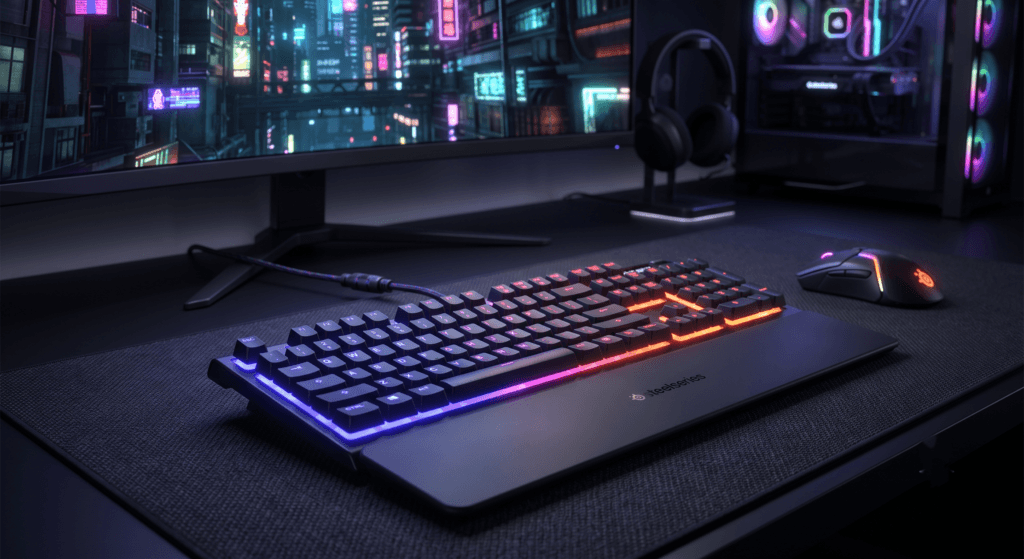
Nobody wants a premium keyboard that flexes under pressure. The Apex series features a Series 5000 metal alloy top plate. It feels incredibly sturdy, heavy enough to stay planted during intense gaming sessions, and provides a premium metallic sheen that bounces RGB light beautifully.
2. Whisper-Quiet or Tactile Switches
Depending on the specific Apex model you choose, you’re getting some of the best switches on the market. From their whisper-quiet gaming switches (perfect for streamers who don’t want mic bleed) to the legendary adjustable OmniPoint switches found on the Pro models, the keystrokes are buttery smooth with zero ping.
3. Brilliant PrismSync RGB
If you are building a lavender setup, lighting is everything. SteelSeries’ Engine software allows you to map millions of color combinations per key. You can easily dial in the exact hex codes for pastel purples, soft pinks, and icy whites to match your exact aesthetic.
Comparison Guide: SteelSeries Apex vs. The Competition
How does the Apex hold up when placed side-by-side with its biggest rivals in the premium keyboard space?
| Feature | SteelSeries Apex | Razer Huntsman V2 | Corsair K70 RGB Pro |
|---|---|---|---|
| Build Material | Aircraft-grade aluminum | Matte aluminum top plate | Brushed aluminum |
| RGB Customization | Top-tier (PrismSync) | Excellent (Chroma) | Good (iCUE) |
| Wrist Rest | Magnetic, soft-touch | Plush leatherette | Hard textured plastic |
| Best For… | Aesthetics & adjustability | Optical switch lovers | Hardcore macro users |

How-To: Styling Your Keyboard for a “Lavender” Setup
If you bought the Apex specifically to complete a custom aesthetic, here is a quick how-to guide to getting that perfect Instagram-worthy desk:
- Dial in the Hex Codes: Open the SteelSeries Engine software. Instead of using preset colors, manually input Hex codes like
#E6E6FA(Lavender) or#D8BFD8(Thistle) for a soft, glowing pastel vibe. - Swap the Keycaps: The Apex uses standard MX-style stems. Grab a set of double-shot PBT pudding keycaps or custom lavender keycaps from Amazon to completely transform the board’s daytime look while letting the RGB shine through at night.
- Pair with a Pastel Desk Mat: Contrast the sleek black aluminum frame of the Apex with a soft pastel desk mat to make the board pop visually.
Final Verdict: Should You Buy It?
The SteelSeries Apex is more than just a pretty face for your desk setup. It backs up its gorgeous design with heavy-duty construction, industry-leading lighting customization, and switches that feel incredible whether you are writing an essay or clutching a 1v5 in Valorant.
If you’re ready to elevate your desk setup from “basic” to “premium,” this keyboard is a fantastic investment that will easily last you through years of heavy use.
Ready to Upgrade?
Grab your SteelSeries Apex and start building your dream setup today.
Buy it on Amazon