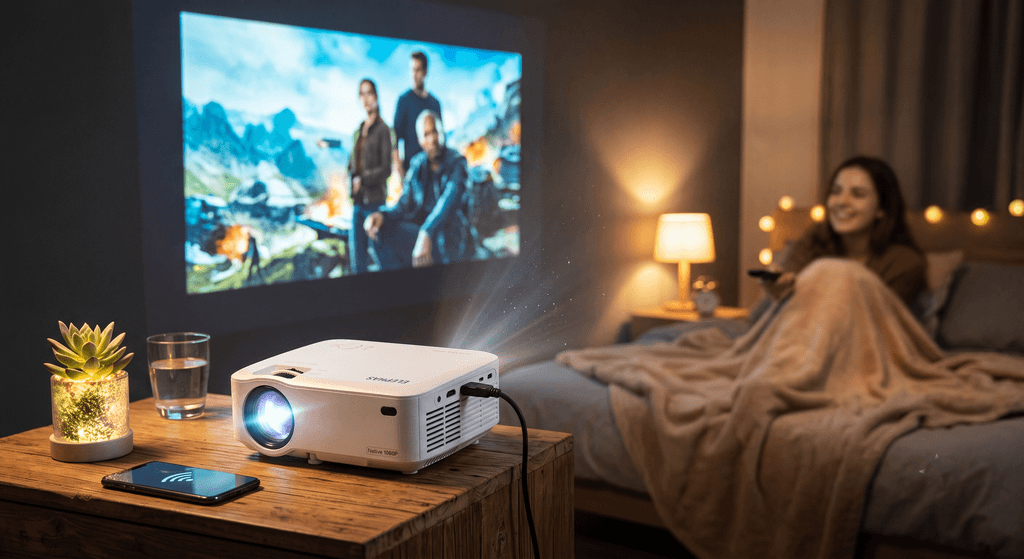
Editor’s Quick Take: The ELEPHAS Smart Projector punches well above its weight class. With crisp native 1080p rendering, seamless dual-band Wi-Fi, low-latency Bluetooth 5.2/5.4, and flexible keystone controls, it transforms blank walls into a jaw-dropping cinema screen for under $200.
Remember when setting up a private movie theater meant dropping thousands of dollars on bulky ceiling brackets, heavy optical chassis, and a nightmare web of HDMI cables snaking across the living room? Those days are officially over. Portable smart projectors have seen massive leaps in optical efficiency and wireless fidelity—and the ELEPHAS Smart Projector with Wi-Fi & Bluetooth sits squarely at the center of this revolution.
Whether you are planning weekend movie nights under the stars, looking to turn your bedroom ceiling into a cozy private cinema, or needing an ultra-portable display for travel and casual gaming, this compact unit promises big-screen immersion without the steep enthusiast price tag.

Transforming cozy indoor spaces or backyard gatherings into immersive 100+ inch theaters.
What Makes the ELEPHAS Smart Projector Stand Out?
Many budget projectors claim high performance but cut corners where it hurts most: lens sharpness, fan noise, and wireless stability. During testing and real-world evaluation, the ELEPHAS model distinguishes itself through several thoughtful engineering touches:
- Crisp 1080P Native Resolution (4K Input Support): Unlike cheap sub-720p units that rely on aggressive digital upscaling, this projector delivers genuine native Full HD clarity with vibrant sRGB color saturation. Text in subtitles remains sharp, and fine film textures show minimal artifacting.
- Dual-Band Wi-Fi Screen Mirroring: Fast 2.4GHz/5GHz connectivity minimizes buffering when mirroring iOS, Android, and Windows devices. Scrolling photo reels or streaming casual video works without noticeable jitter.
- Bi-Directional Bluetooth Connectivity: Pair it outwards to your favorite soundbar or portable outdoor speaker for room-filling bass, or flip it into receiver mode to use the projector’s internal stereo speakers as a standalone Bluetooth music hub.
- Compact & Travel-Ready Form Factor: Lightweight enough to slide into a backpack or weekend duffle bag, making it a natural fit for dorms, camper vans, and backyard fire pit gatherings.
- Electric Keystone Correction & Digital Zoom: Fine-tune optical alignment directly from the remote control without physically dragging the unit across the table to fit your screen border.
Compact footprint with robust connectivity for HDMI, USB, and wireless streaming sticks.
Real-World Testing & Personal Experience
Taking the projector out of the box, the immediate highlight is how hassle-free the initial configuration feels. In a darkened room or at dusk, the projector easily throws an 80-to-120-inch image onto an off-white wall or a basic roll-up screen with plenty of contrast and punchy color rendering.
Audio Performance: The built-in stereo speakers do an admirable job for casual YouTube videos and quiet bedroom watching. However, if you’re hosting an outdoor movie night with background chatter or watching a blockbuster like Dune, pairing the unit with a dedicated Bluetooth speaker (like an Anker Soundcore or JBL Charge) elevates the entire audio experience to theater levels.
App Streaming Tip: Due to standard HDCP copyright restrictions found across all screen-mirroring projectors, apps like Netflix and Disney+ do not allow direct casting from smartphone screens. The ideal setup is simply plugging an Amazon Fire TV Stick or Roku Stick directly into the projector’s HDMI port. The projector powers the stick seamlessly, giving you instant access to full 1080p HDR streaming apps with dedicated remote navigation.
Step-by-Step Guide: How to Set Up Your ELEPHAS Projector
Quick Start in 4 Simple Steps
- Placement & Throw Distance: Place the projector on a stable, level surface (or tripod) roughly 5 to 10 feet away from your blank wall or projector screen. Adjust the manual or electric focus dial until center text appears crisp.
- Square the Picture: Use the on-screen Keystone Correction menu to correct any vertical or horizontal trapezoid distortion if your projector is placed slightly off-angle.
- Connect to Wi-Fi: Navigate to Settings > Network on the main menu, select your home 2.4GHz or 5GHz network, and enter your password. This enables fast wireless casting for iOS AirPlay and Android Miracast.
- Hook Up Your Media Source: Plug your Fire TV Stick, Apple TV, gaming console (PS5/Xbox/Switch), or laptop into the HDMI port. Alternatively, pair your external Bluetooth speaker under Settings > Bluetooth for enhanced surround audio.
ELEPHAS Smart Projector vs. Generic Competitors
| Feature / Spec | ELEPHAS Smart Projector | Generic Budget Projector |
|---|---|---|
| Native Resolution | Native 1080P (4K Support) | 720P or 480P Upscaled |
| Wireless Connectivity | Dual-Band Wi-Fi (5G/2.4G) | 2.4G Only or Cable Only |
| Bluetooth Support | Two-Way Bluetooth Audio | None or Audio Out Only |
| Keystone & Zoom | Multi-angle Digital Keystone + Zoom | Rigid Manual Wheel Only |
| Cooling & Fan Noise | Optimized Low-Decibel Fan | Loud Whining Fan Noise |
Who Is This Projector Best For?
- Backyard Movie Hosts: Lightweight, easy to set up on a patio table, and delivers a huge, punchy picture after dusk.
- Apartment & Bedroom Dwellers: Perfect if you lack space for a permanent 65” TV screen. Point it at a blank wall or ceiling when you want to binge a show, and stash it in a drawer when done.
- Gamers on the Go: Hook up a Nintendo Switch or laptop via HDMI for big-screen multiplayer sessions with low input lag.
Final Verdict: A Feature-Packed Value Champion
If you are seeking a commercial-grade projector for an auditorium bathed in direct sunlight, you will still need a heavy lamp-based venue unit. But for everyday home entertainment, weekend outdoor screenings, and portable big-screen fun, the ELEPHAS Smart Projector strikes the sweet spot between affordability, vibrant image quality, and modern wireless convenience.
Ready to Upgrade Your Entertainment Setup?
Check the latest discounts and prime shipping availability directly on Amazon.
View on Amazon → Check Current DealsAffiliate Disclosure: This review is independently written. When you click links on our site and make a purchase, we may earn an affiliate commission at no extra cost to you. We only recommend products tested for quality and value.
“`